ProPixelizer's Render Feature adds rendering instructions and passes that are required for ProPixelizer to work. The settings provide additional controls to tweak ProPixelizer to your needs, as described below:
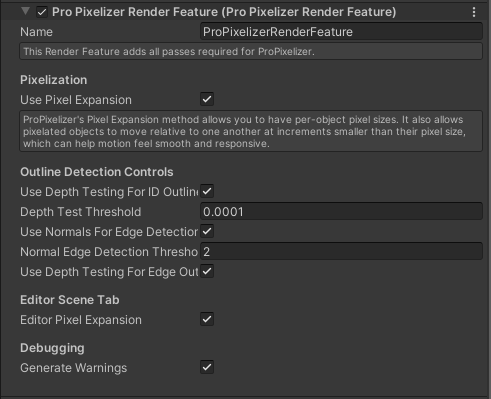
Pixelization
These properties configure the methods ProPixelizer uses to pixelate the scene.
Use Pixel Expansion: allows pixelated objects to move with apparent sub-pixel motion relative to one another, without pixel creep. I created this method specifically for ProPixelizer, see the pixelization options for more information. It requires an additional post-process shader to be applied to the scene, but the smooth sub-pixel motion can make certain games feel more responsive.
Outline Detection Controls
These properties configure properties of the outline and edge detection shaders.
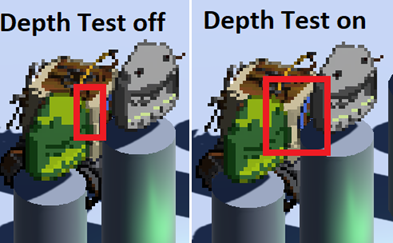
Use Depth Testing for ID Outlines: when enabled, outlines will only be drawn for edge pixels that are in front of their neighbors. This helps achieve the feel of a hand-drawn sprite, for which the outline would not change depending on the geometry in front of it. A comparison of the two settings is shown in the image below; take particular notice of the darker outline drawn over the vehicle inside the red box when Depth Test is off. TheDepth Test Thresholdcan be adjusted to make ProPixelizer more or less sensitive to depth testing of ID outlines.Use Normals For Edge Detection: enables detection of edges (creases and ridges) using the scene normals. TheNormal Edge Detection Thresholdcan be adjusted to change the sensitivity of the edge detection kernel.Use Depth Testing for Edge Outlines: controls whether depth testing should also be used for edges, enabling correct edge detection of objects like staircases.
URP Renderer
Prepass Configuration: This configures whether or not to use depth prepasses. ProPixelizer's setting here must match those in use on your render pipeline.Auto Detectis the recommended option, in which ProPixelizer will attempt to select the correct setting based on the other Render Features you have active.
Editor Scene Tab
Editor Pixel Expansion: when false, disables pixel expansion in the Editor's Scene tab only.
Debugging
Generate Warnings: allows you to disable warnings generated by ProPixelizer.